


Power Apps
Public Group
Public Group
Active 3 months ago
L’outil low-code pour créer des applications PC et mobiles.
Public Group
Organizer:
- Organisé par
-

Application km
Application km
Posté par Scooby sur 18 juin 2025 at 21h36Salut,
J’aimerai créer une petit appli afin que mes collègues et moi, puissions rentrer quotidiennement nos kilomètres perso et pro.
Pouvez-vous m’aider pas à pas ?Nous avons déjà un tableau qui se compose comme suit :
- Nom : Automatique selon l’adresse mail
- Société : Automatique toujours pareil (est-ce utile ?)
- Immat : Selon le mail
- Date : du jour
- Kilométre de début : Identique au km de fin quand on ajoute une ligne
- Kilométre de fin
- Nbre de km (calcul)
- Déplacement : Choix “Pro” ou “Perso”
- Objectif de déplacement : Texte
- Type de véhicule : Choix “Diesel” ou “Essence”
- Carburants : Nbre de litres
- Justificatifs carburant : Prendre une photo du ticket
Voilà sympa si vous voulez m’aider 😉
Merci par avance
@+
Scooby a répondu 1 year, 4 months ago 2 Membres · 3 Réponses- 3 Réponses

Bonjour,
Depuis un site Sharepoint, je te propose de créer une liste d’après ce modèle (à copier dans un fichier .csv) :
ListSchema={“schemaXmlList”:[“<Field ID=\”{fa564e0f-0c70-4ab9-b863-0177e6ddd247}\” Type=\”Text\” Name=\”Title\” DisplayName=\”Title\” Required=\”FALSE\” SourceID=\”http://schemas.microsoft.com/sharepoint/v3\” StaticName=\”Title\” FromBaseType=\”TRUE\” MaxLength=\”255\” />”,”<Field ID=\”{60a23455-63cb-4cb4-8324-5fc032e3a1e2}\” DisplayName=\”immatriculation\” Name=\”field_2\” StaticName=\”field_2\” Type=\”Text\” />”,”<Field ID=\”{f73e0823-8734-4adc-9c35-2f2a2def7501}\” DisplayName=\”date_deplacement\” Name=\”field_3\” StaticName=\”field_3\” Type=\”Text\” />”,”<Field ID=\”{5c762a4e-1468-468e-8cc8-0e0890915aa0}\” DisplayName=\”km_debut\” Name=\”field_4\” StaticName=\”field_4\” Type=\”Number\” />”,”<Field ID=\”{f66084f4-3aed-4e92-aa51-6b8013714668}\” DisplayName=\”km_fin\” Name=\”field_5\” StaticName=\”field_5\” Type=\”Number\” />”,”<Field ID=\”{f53d37c4-ff23-471e-8520-ab44b8e6367d}\” DisplayName=\”distance\” Name=\”field_6\” StaticName=\”field_6\” Type=\”Number\” />”,”<Field ID=\”{f8f2badb-4497-4ffe-b51e-f2ab29b12b29}\” DisplayName=\”objectif_deplacement\” Name=\”field_8\” StaticName=\”field_8\” Type=\”Text\” />”,”<Field ClientSideComponentId=\”00000000-0000-0000-0000-000000000000\” DisplayName=\”type_vehicule\” FillInChoice=\”FALSE\” Format=\”Dropdown\” Name=\”field_9\” Title=\”type_vehicule\” Type=\”Choice\” ID=\”{ee3c0f64-a7c3-4514-9a39-262bb46bb6c9}\” StaticName=\”field_9\”><CHOICES><CHOICE>Diesel</CHOICE><CHOICE>Super</CHOICE><CHOICE>GPL</CHOICE><CHOICE>Électrique</CHOICE></CHOICES></Field>”,”<Field ID=\”{ce4736e6-ab24-4288-b12a-a202fc6237c4}\” DisplayName=\”depense_carburant_ou_recharge\” Name=\”field_10\” StaticName=\”field_10\” Type=\”Number\” />”,”<Field DisplayName=\”Utilisateur\” Format=\”Dropdown\” IsModern=\”TRUE\” List=\”UserInfo\” Name=\”Utilisateur\” Title=\”Utilisateur\” Type=\”User\” UserSelectionMode=\”0\” UserSelectionScope=\”0\” ID=\”{169fee3e-a27f-40d0-a9c7-47a348888a4a}\” StaticName=\”Utilisateur\” />”,”<Field DisplayName=\”Justificatif\” Format=\”Thumbnail\” IsModern=\”TRUE\” Name=\”Justificatif\” Title=\”Justificatif\” Type=\”Thumbnail\” ID=\”{4911cc0b-2ad3-4845-8632-cde340413b2d}\” StaticName=\”Justificatif\” />”,”<Field CustomFormatter=\”{"elmType":"div","style":{"flex-wrap":"wrap","display":"flex"},"children":[{"elmType":"div","style":{"box-sizing":"border-box","padding":"4px 8px 5px 8px","overflow":"hidden","text-overflow":"ellipsis","display":"flex","border-radius":"16px","height":"24px","align-items":"center","white-space":"nowrap","margin":"4px 4px 4px 4px"},"attributes":{"class":{"operator":":","operands":[{"operator":"==","operands":["@currentField","Pro"]},"sp-css-backgroundColor-BgCornflowerBlue sp-field-fontSizeSmall sp-css-color-CornflowerBlueFont",{"operator":":","operands":[{"operator":"==","operands":["@currentField","Perso"]},"sp-css-backgroundColor-BgMintGreen sp-field-fontSizeSmall sp-css-color-MintGreenFont",{"operator":":","operands":[{"operator":"==","operands":["@currentField",""]},"","sp-field-borderAllRegular sp-field-borderAllSolid sp-css-borderColor-neutralSecondary"]}]}]}},"children":[{"elmType":"span","style":{"overflow":"hidden","text-overflow":"ellipsis","padding":"0 3px"},"txtContent":"@currentField","attributes":{"class":{"operator":":","operands":[{"operator":"==","operands":["@currentField","Pro"]},"sp-field-fontSizeSmall sp-css-color-CornflowerBlueFont",{"operator":":","operands":[{"operator":"==","operands":["@currentField","Perso"]},"sp-field-fontSizeSmall sp-css-color-MintGreenFont",{"operator":":","operands":[{"operator":"==","operands":["@currentField",""]},"",""]}]}]}}}]}],"templateId":"BgColorChoicePill"}\” DisplayName=\”Type_deplacement\” FillInChoice=\”FALSE\” Format=\”Dropdown\” IsModern=\”TRUE\” Name=\”Type_deplacement\” Title=\”Type_deplacement\” Type=\”Choice\” ID=\”{0467e833-8e73-40c2-b8d1-036398276ab2}\” StaticName=\”Type_deplacement\”><CHOICES><CHOICE>Pro</CHOICE><CHOICE>Perso</CHOICE></CHOICES></Field>”]}
“Titre”,”date_deplacement”,”Type_deplacement”,”objectif_deplacement”,”immatriculation”,”km_debut”,”km_fin”,”distance”,”type_vehicule”,”depense_carburant_ou_recharge”,”Utilisateur”,”Justificatif”
“Déplacement 1″,”26/12/2024″,”Pro”,”Visite chantier”,”XX-000-XX”,”12 630″,”12 645″,”15″,”Électrique”,”0″,,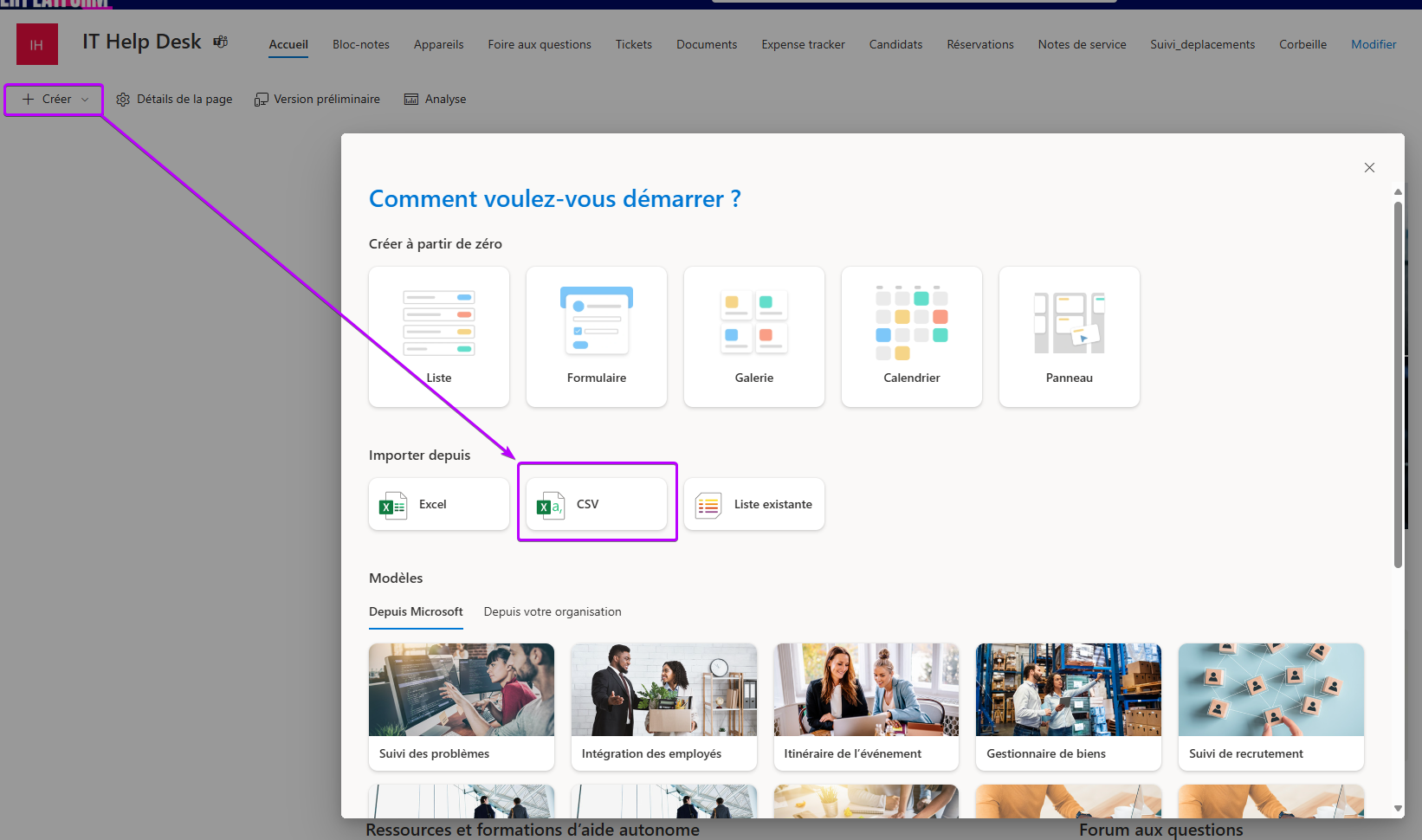
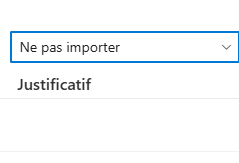
il faudra ne pas importer la colonne Justificatif et la recréer (type image)
Tu pourras ensuite générer une appli en suivant ce tuto (passe direct à l’étape 3) :
Power Apps : Générer une app Canvas d’après une liste SharePoint – Base de connaissances – PPFC
Pour les règles métier, tu pourrais modifier la propriété “default” du datacard des champs concernés :
- Nom : Récupérer l’utilisateur connecté avec User()
- Immat : Récupérer le dernier enregistrement créé par l’utilisateur avec Last(Filter(Liste_deplacements ; Utilisateur.Email = User.Email)).Immat
- Date : du jour : Today() ou Now()
- Kilométre de début : Récupérer le plus grand kilométrage de fin pour le véhicule : Max(Filter(Liste_deplacements ; Immat = Immat_Datacard.Update);Immat)
- Nbre de km (calcul) Soustraire km_fin_Datacard – km_debut_Datacard

ppfc.fr
Power Apps : Générer une app Canvas d'après une liste SharePoint - Base de connaissances - PPFC
Power Apps : Générer une app Canvas d'après une liste SharePoint - Base de connaissances - PPFC

Bonjour DavidZed,
Désolé pour la réponse tardive mais pas mal pris au taf 😉
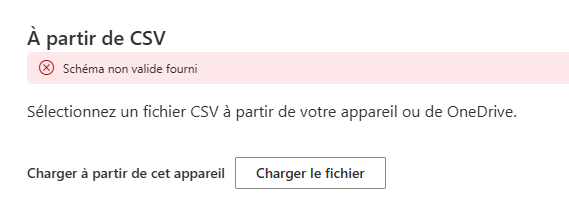
Du coup, je suis peut-être nul mais j’ai copié tout ton texte et coller dans excel et enregistrer sous CSV mais cela ne fonctionne pas quand j’importe dans sharepoint.
Cela me met “Schéma non valide fourni”. J’ai essayé d’autres CSV mais pareil.
Peux-tu me dire ce qu’il faut faire ?
Je bloque déjà sur ça ! 😀
Merci par avance
@+
Bonjour DavidZed,
J’ai réessayé mais pareil.
As-tu pu regarder mon message ?
Merci par avance
@+
Cela me met ça :
Connectez-vous pour répondre.